
Understanding Node.js architecture: Single threaded, Event Loop and Non-Blocking I/0
Introduction:
Node.js is a popular JavaScript runtime environment built on Google Chrome’s V8 engine. It allows developers to create fast and scalable web applications and real-time systems such as chat applications, video streaming platforms, and e-commerce sites. Node.js is widely adopted by major tech companies, making it a popular choice among startups for building fast and reliable MVPs.
Many developers mistakenly believe that Node.js is a JavaScript backend framework, which is not true. Node.js is a runtime environment that enables JavaScript to perform server-side operations such as interacting with the operating system and communicating with databases. In simple terms, Node.js takes JavaScript code and executes it on the server.
"Node.js uses single threaded event-driven architecture with Non-blocking I/0 and Event-Loop."
This combination allows Node.js to handle should be hundreds or thousands of concurrent requests at same time efficiently.
1. Single-Threaded model in NodeJS.
In Node.js all javascript code runs on a single main thread using the google chrome's v8 engine.
This means:
- One Call Stack – A fundamental mechanism used by the V8 engine to manage and track the execution of functions. It follows the Last-In, First-Out (LIFO) principle.
- One Execution Thread – JavaScript runs on a single thread.
- One Task at a Time – Only one piece of JavaScript executes at any given moment.
- No Parallel JavaScript Execution – JavaScript code does not run in parallel by default.
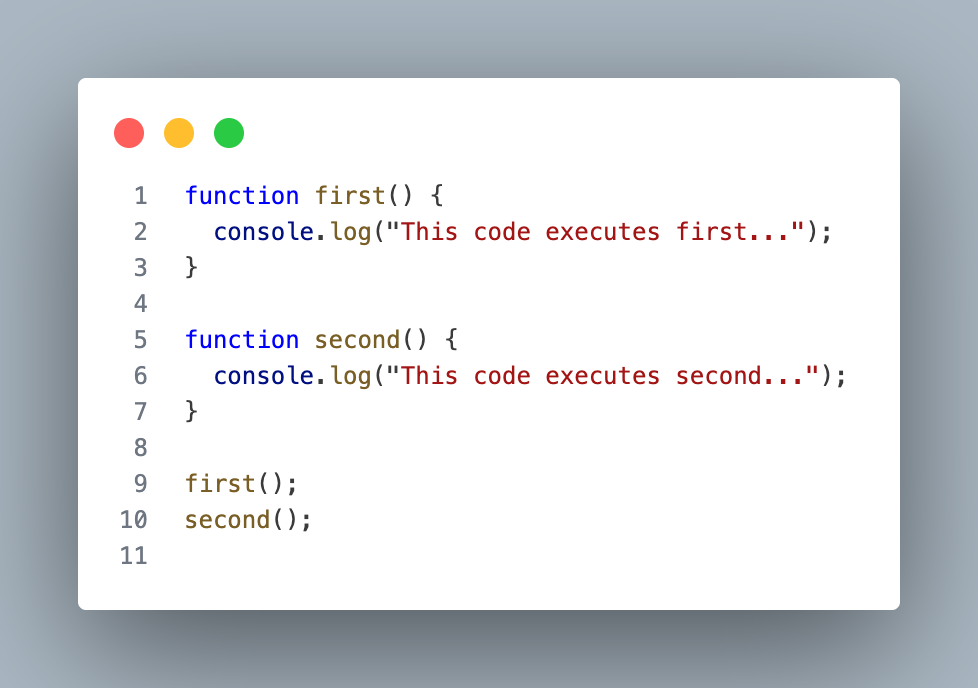
1.1 Simple execution example.
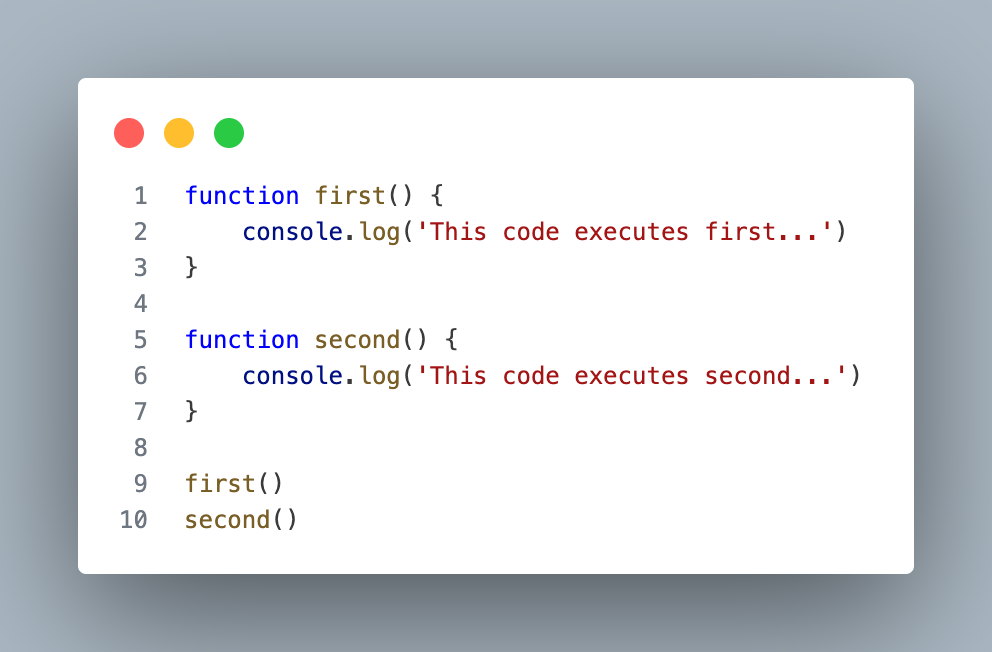
Execution Flow:
first()enters the call stack.- It executes and prints: "This code executes first..."
- It is removed from the call stack.
second()enters the call stack.- It executes and prints: "This code executes second..."
- It is removed from the call stack.
Nothing runs at same time. This is single threaded execution.
1.2 Why Did Node.js Choose a Single-Threaded Model?
Traditional backend servers such as Java-based systems like Spring Boot use a Thread-per-Request model. This means:
- Each incoming request gets its own thread
- The server manages a thread pool
- Threads execute in parallel
While powerful, this model has costs:
- Higher memory usage — each thread consumes memory
- Scalability issues — 10,000 simultaneous requests means 10,000 threads, causing CPU spikes and potential server crashes
- Context switching overhead — the CPU wastes time constantly switching between threads
- Race conditions — multiple threads accessing shared data can cause hard-to-debug bugs
Node.js Takes a Different Approach
Instead of creating multiple threads for each request, Node.js runs all JavaScript code on a single main thread.
At first, this may seem like a limitation:
If everything runs on one thread, how can Node.js scale?
The answer lies in its non-blocking and event-driven architecture.
Node.js does not block the main thread while waiting for slow operations like:
- File reading
- Database queries
- Network requests
Instead, it delegates these tasks to background workers. When the operation completes, the callback is placed in the event queue and processed by the Event Loop.
This design allows Node.js to handle thousands of concurrent connections efficiently — even though JavaScript itself runs on a single thread.
2. Blocking vs Non-blocking I/O
In backend development most operations involve I/O operations, such as:
- Reading files
- Querying databases
- Calling external APIs
The way server handles these operations directly affects performance and scalability.
2.1 Blocking I/O
Blocking I/O means a program should wait until a task finishes before it moves forward. In Node.js, if you use synchronous APIs, the main thread stops until the operation completes.
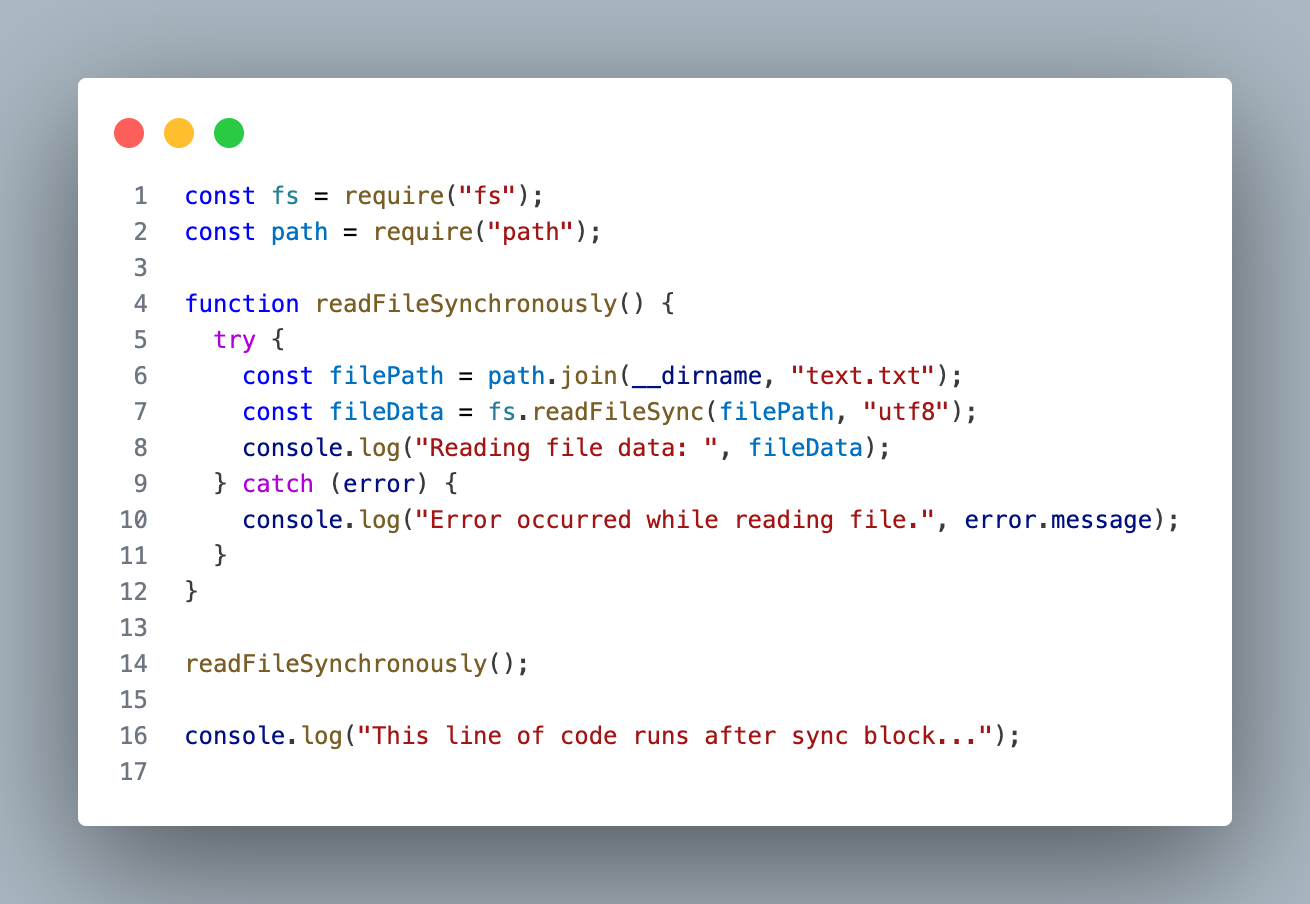
Output:

What happens in blocking I/O ?
The readFileSync() stops the main thread while the file is being read, so nothing else can run during that time.
If many users send requests, they all have to wait — that’s called blocking because the server is stuck until the task finishes.
2.2 Non-Blocking I/O
Non-Blocking I/O means a program starts executing a tasks without waiting. Node.js architecture is build around this idea.
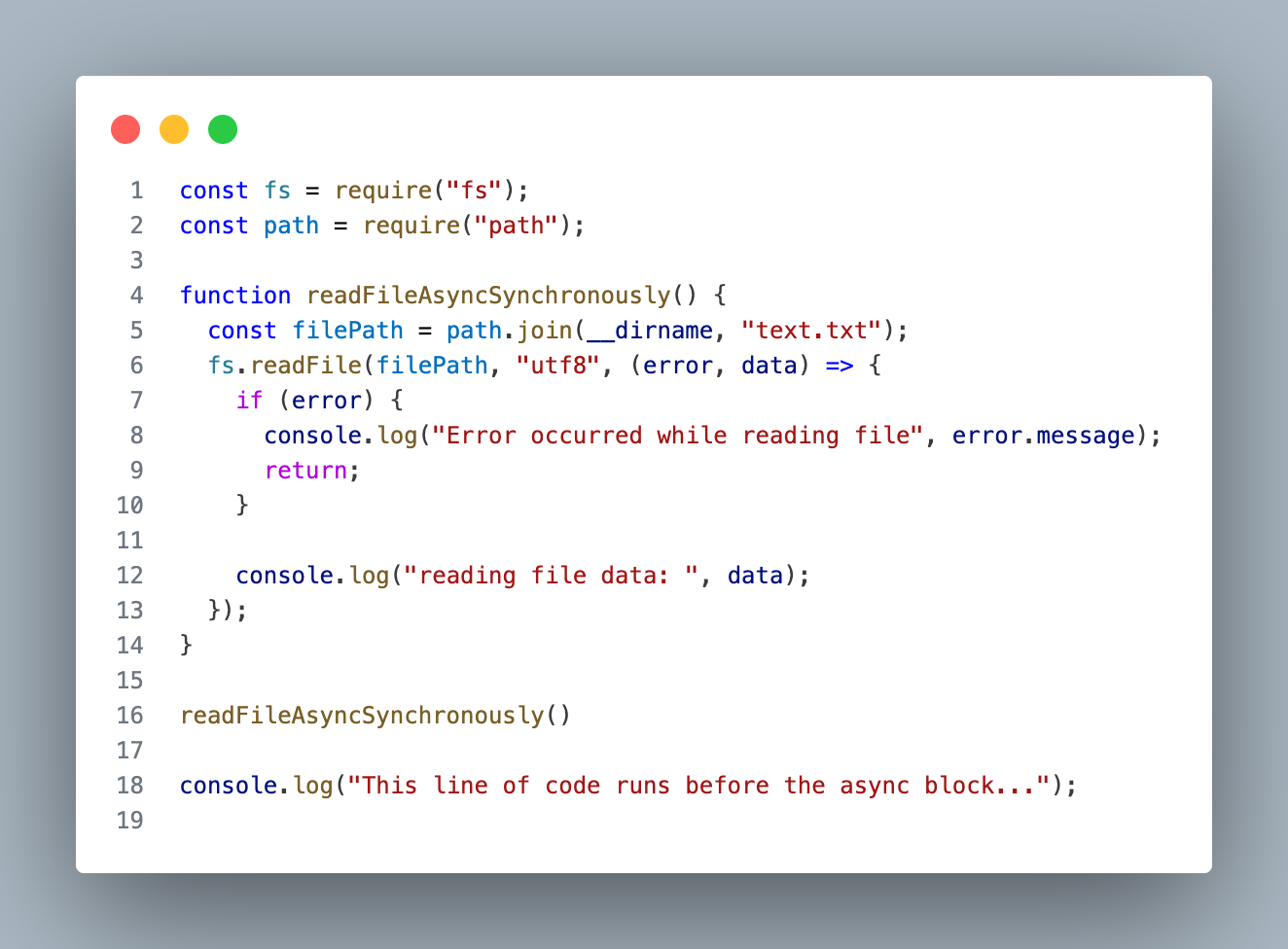
Output:

What happens in Non-blocking I/O ?
The readFile() sends the file-reading work to the system (background thread), and the main thread keeps running immediately.
When the file is ready, the callback executes — the server was never blocked, so it can handle other requests at the same time.
Why Non-Blocking matters than Blocking ?
If 10,000 users hit an API and each database call takes 200ms, a blocking server handles them one by one, making everyone wait and slowing the system down.
With non-blocking, all requests are started immediately, the thread keeps serving others, and responses are handled when ready — that’s why Node.js scales well for APIs, real-time apps, and streaming services.
3. Event Loop - The brain of Node.js.
At this point we know Node.js runs javascript on single thread and uses Non-blocking I/O. But the real questions is if everything runs on single threaded then how does Node decide what to run next ?
The answer is Event Loop.
3.1 What is Event Loop ?
The Event-Loop is a mechanism that continuously checks
- Is the call stack empty?
- If yes, what task should run next?
It is responsible for deciding the execution order of asynchronous code. Without the Event Loop, asynchronous behavior in Node.js would not be possible.
3.2 The three main components of Event Loop.
To understand Event Loop clearly, we need to understand three things.
- Call Stack
The call stack is where JavaScript code executes.
It works in a simple way:
- A function enters the stack
- It executes
- It leaves the stack
Only one function can run at a time synchronously.
Example.
Output:

Key Rules:
- Synchronous only — runs code line by line
- One thing at a time — single threaded
- Blocks everything if something takes too long
- When Call Stack is empty → Event Loop steps in
- Callback Queue (Task Queue / Macro task Queue)
When an asynchronous operation like setTimeout(), setImmediate(), fs.readFile(), and fetch() completes, its callback does not go directly into the call stack. Instead, it goes into the callback queue and waits. The Event Loop moves it into the call stack only when the stack is empty.
Key Rules:
- Callbacks wait here until Call Stack is empty
- FIFO — First In, First Out (opposite of Call Stack)
- First callback added = first one to be picked up
- Event Loop is the one that moves callbacks from here → Call Stack
- Microtask Queue
The Microtask queue is a high-priority queue which is always used for Promises such as Promise.then(), Promise.catch(), Promise.all() and async/await.
Key Rule
- Microtasks ALWAYS run before Macrotasks (Callback Queue / Task Queue)
Final Workings
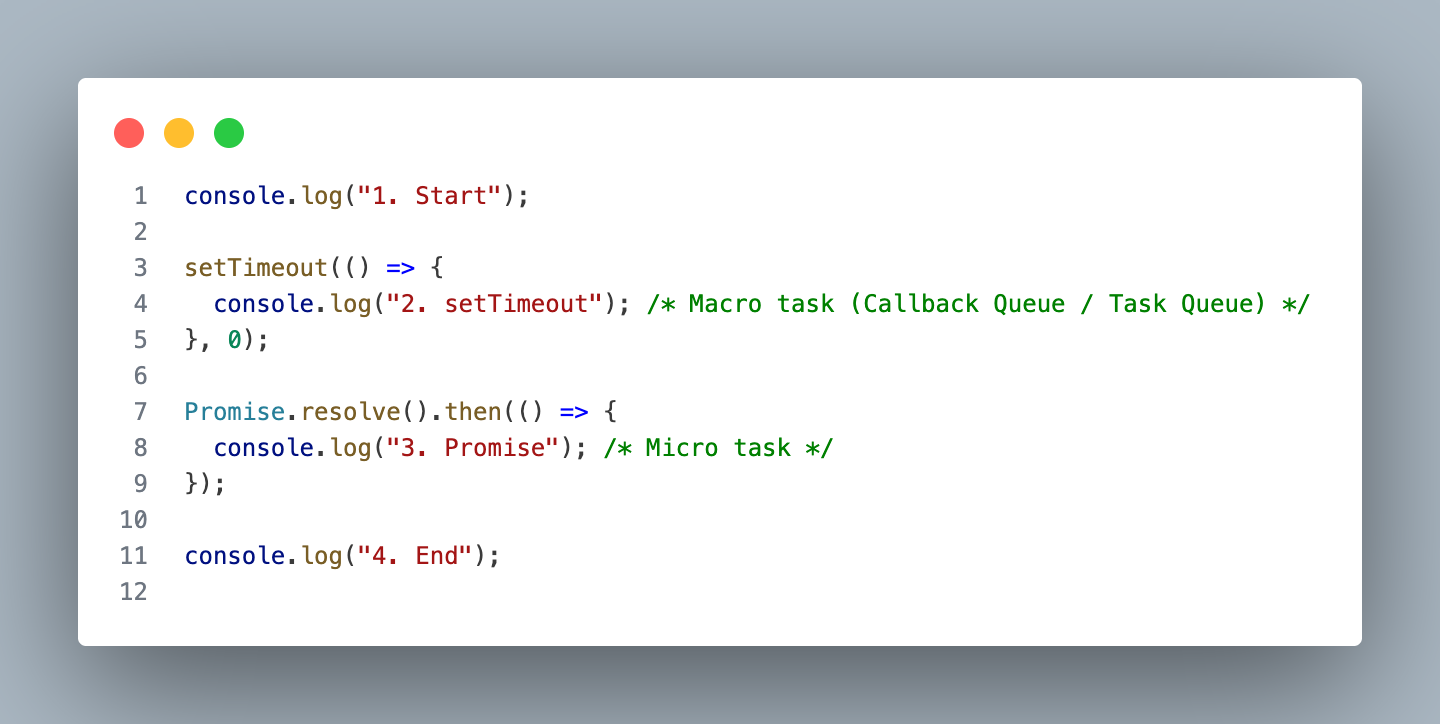
How the Event Loop Processes Code:
Phase 1 — Synchronous code runs first:
JavaScript reads the code top to bottom and executes everything synchronous immediately.
- Line-1: console.log("1. Start") → Call Stack → executes → prints "1. Start"
- Line-3: setTimeout(callback, 0) → Call Stack → handed to libuv timer → callback sent to MACROTASK QUEUE
- Line-7: Promise.resolve().then(callback) → Promise resolves instantly → callback sent to MICROTASK QUEUE
- Line-11: console.log("4. End") → Call Stack → executes → prints "4. End"
State after sync code:
CALL STACK: [ empty ]
MICROTASK QUEUE: [ Promise callback ]
MACROTASK QUEUE: [ setTimeout callback ]
Output so far:
1. Start
4. End
Phase 2 — Call Stack empty! Event Loop checks Microtasks FIRST:
MICROTASK QUEUE has Promise callback!
→ Event Loop moves it to Call Stack
→ Executes → prints "3. Promise"
→ Microtask Queue now empty
State:
CALL STACK: [ empty ]
MICROTASK QUEUE: [ empty ]
MACROTASK QUEUE: [ setTimeout callback ]
Output so far:
1. Start
4. End
3. Promise
Phase 3 — Microtasks empty! Now pick from Macrotask Queue:
MACROTASK QUEUE has setTimeout callback!
→ Event Loop moves it to Call Stack
→ Executes → prints "2. setTimeout"
Final State:
CALL STACK: [ empty ]
MICROTASK QUEUE: [ empty ]
MACROTASK QUEUE: [ empty ]
Final Output:
1. Start
4. End
3. Promise ← Microtask ran before Macrotask!
2. setTimeout ← Macrotask ran last
Conclusion.
We explored how:
- JavaScript runs on a single call stack
- The Event Loop continuously monitors and executes asynchronous tasks
- The microtask queue and callback queue control execution priority
Together, these components allow Node.js to handle thousands of concurrent operations efficiently without creating new threads for every request.
This design is what makes Node.js ideal for:
- APIs
- Real-time applications
- Streaming services
- I/O-heavy systems
Understanding the Event Loop is not just theory — it helps you write better asynchronous code, avoid performance bottlenecks, and truly understand what happens behind setTimeout, Promises, and file operations.


Comments ()